Posts

Huge wait for Huge Progress.

Image
It's Alive!      I would like to officially announce the project has hit 1.0!  I started a git repo, which can be found here .  It has a readme with a less detailed project description and a WIP debugging guide to help you get it working on your machine. 1.0 features 1.0 has 1 predifined mode, chordo, and 5 button functionalities. How to use:      use miniAudicle's window -> device browser to look at which devices are on which channels.  Make sure mout is opening your launchpad's MIDIOUT2, min is opening your launchpad's MIDIIN2, and malt is opening an internal midi channel.  If you don't have one, I recommend LoopBe, which is what I use on my machine.  I think this may require a restart.      BEFORE YOU RUN THE PROGRAM, set your launchpad to programming mode.  You can do this by holding the session button for 2 seconds and pressing the orange button.  Double tap the session button to cancel the animation...
Reaped

Image
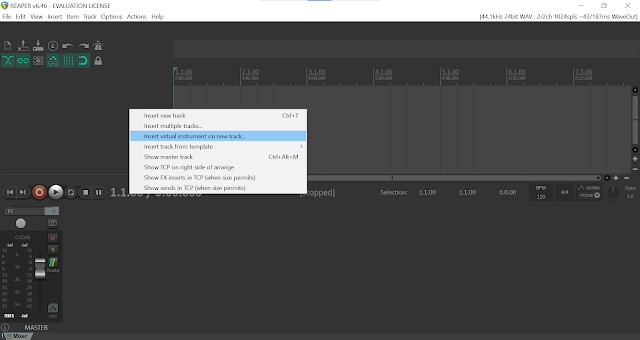
SideQuest: configure any DAW so you can compose music online      I have a lot of things to work on as a college student.  Aside from developing this project, I am also programming for a math class, writing for an art class, and composing for my games class.  I have been quite thoroughly sidetracked by that composition.     Here's what I learned from setting up Reaper, my second digital audio workstation.  DAWs are a hub, but they need instruments to work.  These instruments come in the form of plugins.  Normally, you just download the plugins, which put their "handles" in the right place, and your DAW automatically finds them.  If  that doesn't work, you can add a new folder to the paths your DAW and rescan.      This took me 3 hours to figure out. How hard it should have been How hard it was     Quest Rewards:  I will readily admit this was a huge time sync with the single benefit of getting some...

My Models

Launchpad project Examples      The launchpad is a brilliant piece of technology, beloved by many.  This means that plenty of people have done all sorts of cool things with them and shared them in all sorts of ways. YouTube     It may not be the most technical way to document your work, but making YouTube videos is a great way to make your work into popular content.  I'll start by going through a couple examples I appreciate. Composerily  makes impressive visual performances with their launchpad.  Each song has a unique layout of notes and a unique visual effect.  The respective visual effects of each notes even seem to change between notes.  All this is to say that I can pursue live performance or tools for others to create their own performance with confidence that it will be a cool project. Peers     Aaron Lockwood did an interesting project on the launchpad in this class last year.  I don't really intend on ...

Programmer's Reference Manual | 2.1

Image
     The launchpad mini comes with a very useful manual from novation: the Launchpad Mini Programmer's Reference Manual .  I'll be using this post to document my first reading of the document with some notes.  This is ramble-y, so read at your own risk.     First of all, there's a bootloader mode that has a couple useful tools.  The bootloader mode can be accessed by "holding the capture midi button when plugging the device in" which is something I have not yet figured out.  Going through the more general user guide  showed me the mode I was really looking for: the settings menu.  The settings menu gives access to a couple of important things, but most importantly it is the place to switch between live and programmer mode.     The programmer mode is bound to be the crux of the project.  The user manual says, " In Programmer mode Launchpad Mini loses access to Session Mode, and Custom Modes and the entire surface (pads...

Novation Components | 1.3

Image
   I open this brand new software, select my device, the Launchpad Mini , and am brought to this screen with a bunch of tips.  But I quickly realize what it is: customization.   A screenshot of the custom mode editor in novation components      Novation Components is singular "utility" software bundled in the launchpad.  It has a bunch of tools to precisely and quickly give me control over my device.  You can drag the 2x8 chromatic keyboard, the 1x8 scale keyboard, a 4x4 drum grid, or an individual note onto the board, and then customize it.  There are also sliders that feed into midi, although they are strictly 1x8 or 8x1 and no shorter. Lastly, there's a program change button. A screenshot of my custom 8-octave dorian keyboard     The amount of customization is pretty surprising.  While there is a lot of useful stuff here, I still feel I need my own software to truly get the customization I'm looking for.

Performances on the launchpad

Image
     Most of my project is slated to be about the technical side of the soundboard, but while it's still a fresh new item for me, I wanted to play around with it a little.  I gained some minor insights from these experiences.  First of all, there's a keyboard preset that tries to map the buttons of the launchpad like a real keyboard.      This layout is the best possible arrangement for traditional uses for midi devices.  I used it to read music and play like I would on a piano.  It's definitely far more awkward than a traditional midi device for that use case because of the jumps between octaves.  It also has redundant keys for 3 of the Cs, and wastes 12 more buttons to try to evoke the shape of white and black keys.     The other 2 layouts arrange the midi notes in 4 groups of 4.  It's a more efficient use of all 64 buttons on the launchpad, but vertically splits the launchpad in 2, making the experience of pla...

Using the Launchpad for Evil | 1.2

Image
     A launchpad is a huge set of customizable buttons.  A soundboard is a program that can play a huge array of sounds.  It seems only natural to mix the two, to enable me to terrorize my friends on discord.  I looked into it a little and followed this guide .     This was basically supposed to be a fun side project, but it's actually really useful and there's a good chance some of this will be useful later.  First of all, it showed me the integration between the launchpad and ableton live.      The trick here was to drag in a drum rack component. The drum rack seems to be designed specifically to work alongside the launchpad.  It translates from the midi signals while corresponding exactly to the grid.  I can basically conclude that I can use Ableton Live for any musical effect.  It doesn't seem to be able to change the button colors or to use the midi notes to trigger something besides sound.     The...